R2019b linux problem
On R201b (Linux Mint 19.2) is the following problem:
>> mp.Test
mp.Digits() : <- success
mp.GuardDigits() : <- success
double() : <- success
int8() : <- success
uint8() : <- success
int16() : <- success
uint16() : <- success
int32() : <- success
uint32() : <- success
int64() : <- success
uint64() : <- success
colon() : <- success
plus() : <- success
minus() : <- success
times() : <- success
mtimes() : <- success
rdivide() : <- success
ldivide() : <- success
mldivide() : <- success
mrdivide() : <- success
mpower() : <- success
power() : <- success
realpow() : <- success
transpose() : <- success
ctranspose() : <- success
uminus() : <- success
uplus() : <- success
sin() : <- success
cos() : <- success
tan() : <- success
sec() : <- success
csc() : <- success
cot() : <- success
acos() : <- success
asin() : <- success
atan() : <- success
acot() : <- success
atan2() : <- success
hypot() : <- success
cosh() : <- success
sinh() : <- success
tanh() : <- success
sech() : <- success
csch() : <- success
coth() : <- success
acosh() : <- success
asinh() : <- success
atanh() : <- success
acoth() : <- success
asech() : <- success
acsch() : <- success
exp() : <- success
expm1() : <- success
log() : <- success
log10() : <- success
log1p() : <- success
log2() : <- success
nextpow2() : <- success
pow2() : <- success
sqrt() : <- success
reallog() : <- success
realsqrt() : <- success
nthroot() : <- success
pow2(F,E) : <- success
min(), max() : <- success
prod(matrix) : <- success
prod(vector) : <- success
sum(matrix) : <- success
sum(vector) : <- success
cumsum(matrix) : <- success
cumsum(vector) : <- success
cumprod(matrix) : <- success
cumprod(vector) : <- success
dot() : <- success
cross() : 2 <- fail
3 <- fail
9 <- fail
10 <- fail
<- success
svd() : <- success
qr() : <- success
lu(square) : <- success
lu(rect) : <- success
pinv() : <- success
null() : <- success
balance() : <- success
eig() : <- success
qz() : <- success
hess() : <- success
chol() : <- success
schur() : <- success
ordschur() : <- success
rank() : <- success
trace() : <- success
det() : <- success
inv() : <- success
sort(real) : <- success
sort(complex) : <- success
find() : <- success
<,<=,>,>=,==,~= : <- success
and,or,not,xor : <- success
all() : <- success
any() : <- success
isinf() : <- success
isnan() : <- success
isfinite() : <- success
isreal() : <- success
abs() : <- success
sign() : <- success
conj() : <- success
angle() : <- success
imag() : <- success
real() : <- success
complex() : <- success
ceil() : <- success
fix() : <- success
floor() : <- success
idivide() : <- success
round() : <- success
rem() : <- success
mod() : <- success
tril(matrix) : <- success
tril(vector) : <- success
triu(matrix) : <- success
triu(vector) : <- success
diag(matrix) : <- success
diag(vector) : <- success
norm(matrix) : <- success
norm(vector) : <- success
cond() : <- success
rcond() : <- success
factorial() : <- success
mean() : <- success
std() : <- success
erf() : <- success
erfc() : <- success
erfi() : <- success
FresnelS() : <- success
FresnelC() : <- success
gammaln() : <- success
gamma() : <- success
gammainc() : <- success
psi() : <- success
zeta() : <- success
eint() : <- success
logint() : <- success
cosint() : <- success
sinint() : <- success
besselj() : <- success
bessely() : <- success
besseli() : <- success
besselk() : <- success
besselh() : <- success
hypergeom() : <- success
KummerM() : <- success
KummerU() : <- success
expm() : <- success
logm() : <- success
sqrtm() : <- success
sinm() : <- success
cosm() : <- success
sinhm() : <- success
coshm() : <- success
fft : <- success
ifft : <- success
fft2 : <- success
ifft2 : <- success

 add support for subview of array
Matlab creates an additional copy of that slice and since my array is huge, it takes a lot of time.
Is there any possibility to add some function like block operator in eigen3?
Like this one

 previous version download?
Looking for past versions of the multiprecision toolbox on the Advanpix website.
Where are they?
Add precomputeLU support for dense matrix
Now, precomputeLU only supports sparse matrix. In addition, Maybe also precomputeQR.

It is possible to use mp computations in a simulink block or S-function ?
I would like a simulink block which have double precision floating point in input and output but internal computations in this block are made in quadruple precision: it is possible to use with MP Toolbox ?

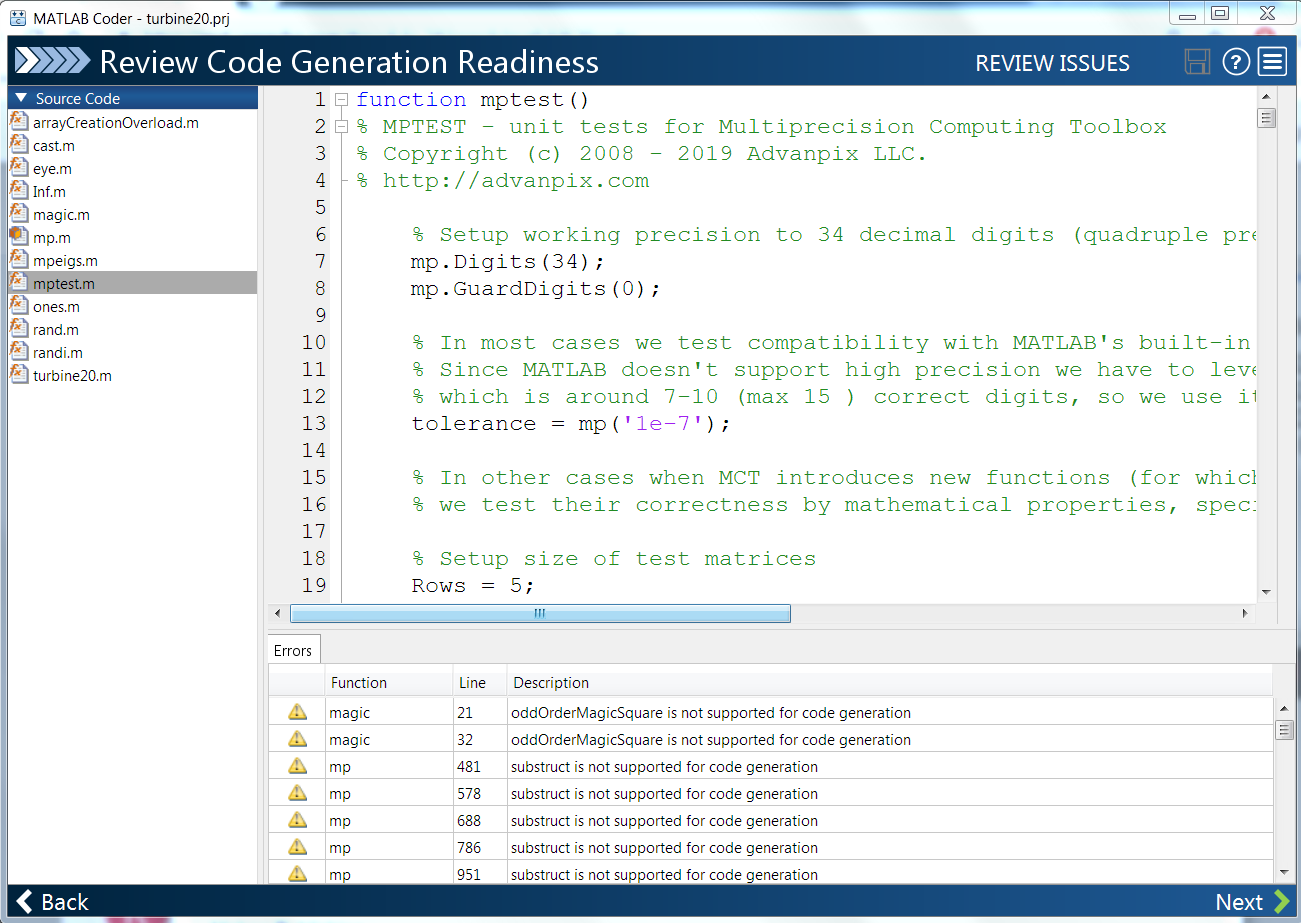
matlab coder
it is not possible to use the Matlab Coder while Advanpix is installed.
(Windows 7, Matlab 2018b.)
Target for coder is turbine20.m below which calls no multiprecision functions or definitions,
Only solution is to uninstall multiprecision toolbox.
Does anyone know how to get around this?

Suggestion for development of optimization solvers under MPT
Pavel,
Given as you say (in https://mct.userecho.com/communities/1/topics/125-mp-linprog-support) the high demand for optimization solvers and the complexity and difficulty of implementing high quality optimization solvers "from scratch", i.e., without access to existing double precision code as starting point for modification, I suggest a different development approach.:
Work with developers//vendors of high-end optimization solvers to modify their code to produce an MPT version. Perhaps the vendor would agree to make such a version available to its customers at no extra cost. What would be in it for the vendor would be potential extra sales. This could still be a non-trivial effort to do well, because even though solvers have a large number of settable parameters related to various tolerances, there may be some algorithmic and implementation decisions which might be implicitly predicated on an assumption that the code is double precision. I have no idea of the do-ability of an MPT version, for instance, if the solver code is in C or C++ and the vendors produce mex file, as I think is the case for the following.
Some suggestions - these are all top-end, under active development, and all have MATLAB toolbox versions.
Note: LP = Linear Program, QP = (linearly constrained) Quadratic Program. QCQP = Quadrqatically Constrained Quadratic Program.. Mi = mixed integer. SOCP = Second Order Cone Problem, which subsumes LP, convex QP and convex QCQP. LMI = Linear Matrix Inequality. = Linear Semidefinite Program.
CPLEX (see https://www.ibm.com/support/knowledgecenter/en/SSSA5P_12.6.3/ilog.odms.cplex.help/CPLEX/MATLAB/topics/gs_ov_toolbox.html ) - LP, MILP,, convex QP, MIQP, convex QCQP, convex MIQCQP, SOCP, MISOCP, local optimal and globally optimal solution of non-convex QP and MIQP, drop-in replacement for lsqlin (linearly constrained linear least squares)
Mosek - LP, MILP, convex QP, convex MIQP, SOCP, MISOCP, LMI, exponential cone (in forthcoming Mosek version 9.0)
KNITRO -all problem classes handled by FMINCON + integer constraints + special handling of complementarity constraints (MPEC) and SOC constraints. Higher performance and more robust than corresponding FMINCON algorithms.
Gurobi - same problem classes as CPLEX, except no non-concex QP and MIQP capability

ODE's benchmark is slower with MCT
Hello, I just found strange behavior (bug?) of MATLAB R2018a (update 3) with latest version of MCT on the Path (Ubuntu Linux 16.04, 64bit).
If I run the bench() function with MCT on the path I get the following results:
>> bench(5)
ans =
0.0743 0.1146 0.0462 0.0832 0.4225 0.5393
0.0750 0.1108 0.0462 0.0845 0.3682 0.4330
0.0739 0.1176 0.0521 0.0895 0.4052 0.4539
0.0785 0.1275 0.0473 0.0826 0.3355 0.4691
0.0744 0.1155 0.0464 0.1066 0.3874 0.4228
The same benchmark run without MCT on the path produce the following results:
>> bench(5)
ans =
0.0745 0.1184 0.0130 0.0839 0.4043 0.5116
0.0798 0.1139 0.0133 0.0834 0.3796 0.4141
0.0809 0.1275 0.0141 0.1051 0.4728 0.4096
0.0850 0.1182 0.0132 0.0839 0.3576 0.4142
0.0884 0.1132 0.0134 0.0859 0.4168 0.4460
As you can see, the 3rd column (corresponding to the ODE's part of MATLAB benchmark) shows significantly (~4x) slower runs in a case of MCT on the path.
Could you clarify and/or reproduce this situation, please?

Hello Michal,
Toolbox overloads standard MATLAB routines to create elementary arrays - zeros, ones, eye, etc.
This is needed to support 'mp' type as argument in such functions, e.g. eye(100,'mp').
If requested type is not 'mp' then toolbox dispatches the call to built-in MATLAB functions (see arrayCreationOverload.m for more details). Dispatch is quick but I expect it to be slower than direct call to double-precision functions.
MATLAB picks up toolbox overload when it is on the path.
Probably this is what causing slow-down in your tests.
R2018a_update3 (Linux) slow down MCT fft related functions
After installation of R2018a_update3 (Ubuntu 16.04 64 bit) was observed significant slow down of some MCT built-in functions (especially fft, ifft,fft2 and ifft2).
I see, thank you for clarification. MATLAB is huge, maybe something went wrong during update.
But definitely, this it is not a toolbox bug :).
Customer support service by UserEcho